RGB Mini Keyboard with Built-in Battery Touch Pad Mouse Backlit Raspberry Pi (PC0010) Products
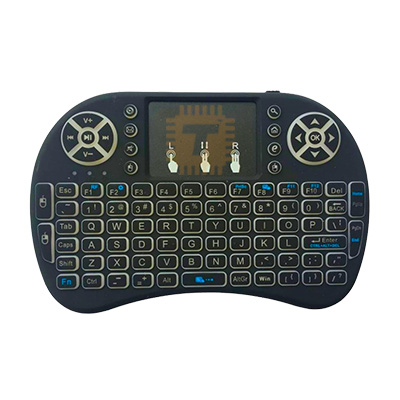
| Name | RGB Mini Keyboard with Built-in Battery Touch Pad Mouse Backlit Raspberry Pi |
| Code | PC0010 |
| Price | Rs.2,500.00 |
| In Stock | Yes |
| Package | PCA |
Product Details
This RGB Mini Wireless Keyboard is an ultra-compact, handheld multimedia controller that combines a full QWERTY keyboard, a navigation pad, and a highly responsive mouse touchpad into one device. Operating on a 2.4GHz wireless connection via a plug-and-play USB dongle, it is powered by an integrated rechargeable lithium-ion battery. It is a favorite accessory for Raspberry Pi hobbyists, home theater PC (HTPC) enthusiasts, and smart TV users.
Specifications
- Connectivity: 2.4GHz Digital Wireless RF Technology
- Operational Range: Up to 10 meters (approx. 30 feet) without signal disturbance
- Power Supply: Built-in rechargeable Lithium-ion battery (charged via Micro-USB/USB-C)
- Backlight Layout: Multi-color RGB (Customizable switching between Red, Green, Blue, or turning off)
- Touchpad Type: High-sensitivity DPI-adjustable touchpad with multi-finger gesture support
- Form Factor: Ergonomic handheld game-controller style design
- Supported OS: Raspberry Pi OS, Windows, Linux, Android, macOS
Key Features
- 3-in-1 Multimedia Combo: Consolidates a wireless keyboard, a multi-finger precision touchpad mouse, and dedicated media hotkeys (Volume +/-, Play/Pause, Home) into a pocket-sized frame.
- Customizable RGB Backlighting: Features integrated LEDs underneath the silicone keys. Users can easily toggle backlighting on or off or cycle through colors to type comfortably in pitch-black rooms.
- True Plug-and-Play: No manual driver installation required. Simply extract the miniature USB receiver hidden inside the battery compartment and slide it into any open USB port.
- Auto-Sleep and Wake Function: To aggressively save battery life, the keyboard enters a deep sleep mode after a few minutes of inactivity. Pressing any key instantly wakes it back up.
- Multi-Touch Gestures: The integrated trackpad supports tap-to-click, double-click for drag-and-drop actions, and two-finger scrolling for navigating long documents or web pages.
Interface & Key Shortcuts
While specific key combinations can vary slightly by manufacturer, the standard control layouts for these mini-keyboards include:
- Turn Backlight On/Off / Change Color: Press and hold the
Fnkey and tapF2(or theLightbulbicon key). On some models, dragging a finger horizontally across the bottom of the touchpad changes the RGB spectrum seamlessly. - Adjust Touchpad Sensitivity (DPI): Press and hold
Fnand tap theSpacebarto cycle between standard and high-speed cursor tracking. - Directional Navigation: Left and right side shoulders often feature standard mouse clicks, mimicking a handheld gaming controller layout for easy web browsing.
Perfect for Raspberry Pi and HTPCs
- Headless Setup Companion: Ideal for setting up a fresh Raspberry Pi without dragging out a massive desktop keyboard and mouse. It takes up a single USB port and runs natively on the boot screen.
- Media Center Controls: Perfect for controlling Kodi, LibreELEC, or Plex OS builds on a Raspberry Pi hooked up to a living room TV.
- Server Maintenance: Compact enough to sit on an industrial rack or network closet shelf for quick terminal commands on headless servers.
Usage and Maintenance Tips
- Dongle Location Storage: If the keyboard won't connect, make sure you've retrieved the USB dongle! Manufacturers safely pack it inside the rear battery hatch next to the lithium battery cell for shipping protection.
- Charging Etiquette: Charge the unit using a standard 5V USB port (like a computer port or basic phone block). Avoid using high-wattage USB-C fast chargers, which can overstress the small internal battery protection circuit.
- Loss of Connection Reset: If the yellow connection LED blinks rapidly and stops responding to the cursor, the keyboard may have desynced from its dongle. Turn the keyboard off, hold down the
F1(orRF) key while turning it back on, and insert the USB dongle close to the unit to pair them again.
Sharing is caring, show love and share the product with your friends.
Featured
Add to Cart
Add to Cart

Other Products
Add to Cart